Danh sách bài viết trong series Học Kubernetes Từ Cơ Bản Đến Chứng Chỉ CKAD
- Lộ Trình Học Kubernetes Từ Cơ Bản Đến Chứng Chỉ CKAD
- Bài 1: Giới Thiệu Kubernetes Và Khái Niệm Cluster Cho CKAD
- Bài 2: Cài Đặt Minikube Và sử dụng kubectl Cơ Bản
- Bài 3: Quản Lý Pod Cơ Bản (Create, Delete, Describe)
- Bài 4: Sử Dụng ConfigMap Và Secret Trong YAML
- Bài 5: Quản Lý Environment Variables Và Command/Args
- Bài 6: Cấu Hình Deployment Và Replica Set
- Bài 7: Thiết Kế Pod Với Nhiều Container
- Bài 8: Sử Dụng Sidecar Và Init Container
- Bài 9: Chia Sẻ Tài Nguyên Giữa Các Container
- Bài 10: Giám Sát Log Và Events Với kubectl logs
- Bài 11: Debug Pod Với kubectl describe Và exec
- Bài 12: Tối Ưu Pod Với Resource Limits Và Requests
- Bài 13: Sử Dụng Liveness Và Readiness Probes
- Bài 14: Tối Ưu Hóa Pod Với HPA (Horizontal Pod Autoscaler)
- Bài 15: Cấu Hình Service (ClusterIP, NodePort)
- Bài 16: Sử Dụng Ingress Và Network Policy
- Bài 17: Quản Lý DNS Và Load Balancing Trong Kubernetes
- Bài 18: Sử Dụng Volume (emptyDir, hostPath)
- Bài 19: Cấu Hình Persistent Volume Và Persistent Volume Claim
- Bài 20: Tổng Kết, Mẹo Thi CKAD, Bài Tập Thực Hành Cuối
Sau khi đã học về DNS và Load Balancing trong Bài 17, chúng ta bắt đầu một domain hoàn toàn mới: State Persistence (10% trọng số CKAD). Đây là phần thi liên quan đến lưu trữ dữ liệu bền vững yếu tố rất quan trọng cho các ứng dụng stateful như database hoặc hệ thống logging.
Bài viết này thuộc domain State Persistence, tập trung vào hai loại volume cơ bản nhất là emptyDir và hostPath hai công cụ đơn giản nhưng cực kỳ thường gặp trong kỳ thi. Trong kỳ thi CKAD, bạn có thể gặp các task như “Tạo Pod có hai container chia sẻ volume qua emptyDir”, “Mount thư mục /var/log từ host bằng hostPath”, hoặc “Debug dữ liệu bị mất khi Pod khởi động lại”. Đây là các bài dễ ăn điểm nếu bạn nắm chắc YAML volume và hiểu rõ sự khác biệt giữa lifecycle của Pod và volume.
Volume Là Gì? Tại Sao Cần Volume Trong Kubernetes?
Volume là một persistent directory mà Pod có thể mount vào container để lưu trữ dữ liệu, chia sẻ giữa containers, hoặc truy cập thư mục trên host. Không giống như container filesystem (ephemeral mất khi container restart), volume giúp dữ liệu sống sót qua restart.
| Vấn đề với Container Filesystem | Giải pháp bằng Volume |
|---|---|
| Dữ liệu mất khi pod die/restart | Volume giữ dữ liệu (tùy loại) |
| Multi-container không chia sẻ file | Shared volume giữa containers |
| Cần access host dir (logs, config) | hostPath mount host path |
CKAD Tip: Volume thuộc State Persistence (10%), thường kết hợp với Pod Design (multi-container). Nếu thấy dữ liệu mất sau khi Pod restart, rất có thể bạn chưa dùng Volume.
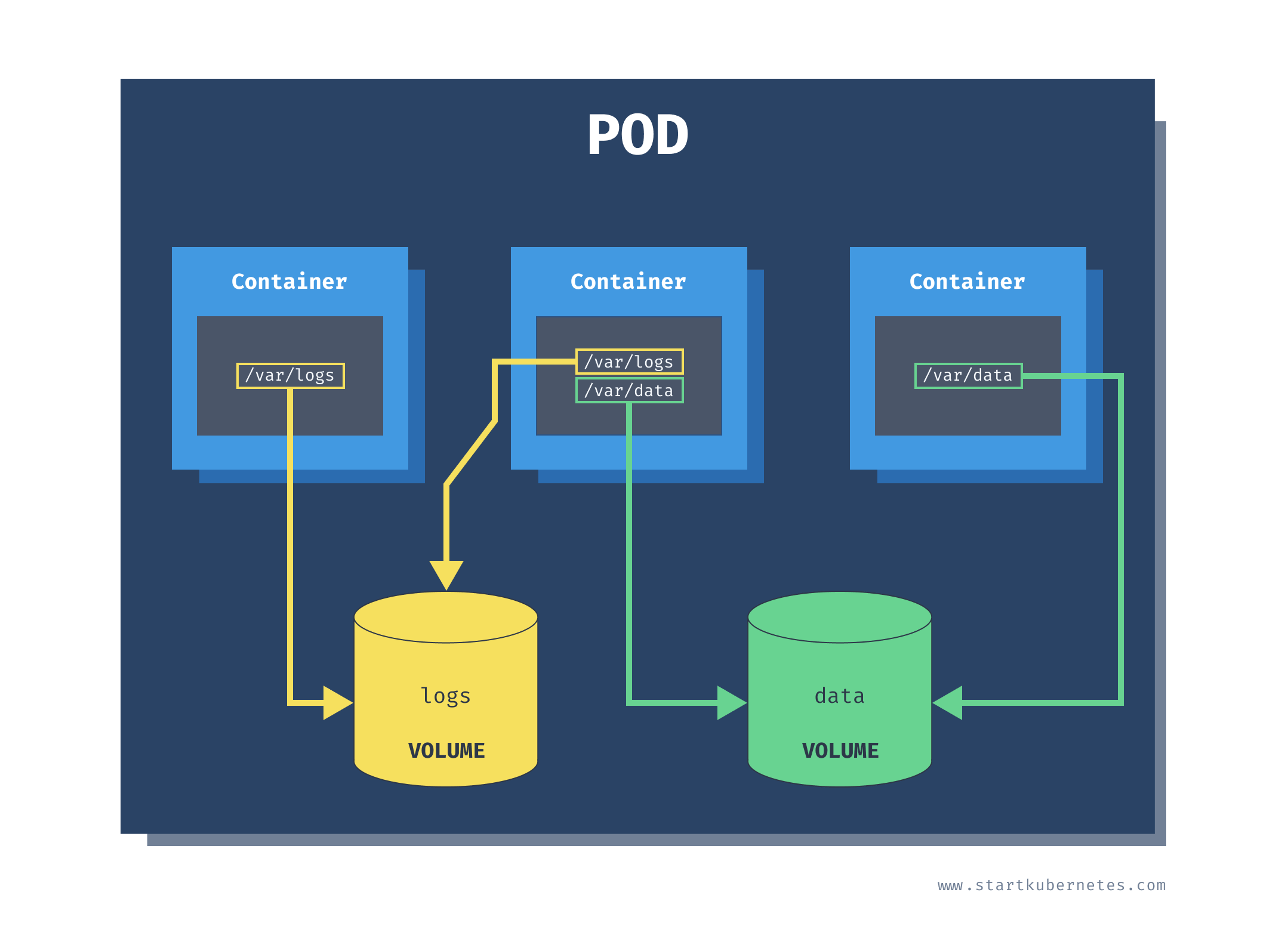
Các Loại Volume Cơ Bản (Tập Trung emptyDir Và hostPath)
Kubernetes hỗ trợ hơn 20 loại volume, nhưng trong kỳ thi CKAD, hai loại cơ bản sau gần như luôn xuất hiện:
| Loại | Mô tả | Bền vững? | Dùng khi |
|---|---|---|---|
| emptyDir | Thư mục rỗng tạm thời, tạo khi Pod start | Không (mất khi Pod delete) | Chia sẻ data giữa containers (logs, cache) |
| hostPath | Mount thư mục từ host node | Có (trên host) | Access host logs/config, dev/test (không production) |
| persistentVolumeClaim | Bền vững, dynamic provision (sẽ học ở Bài 19) | Có | Database, stateful apps |
Trong CKAD: emptyDir và hostPath là hai dạng phổ biến nhất. Dễ ra đề vì không cần cluster storage.
Cấu Trúc YAML Volume Cơ Bản (Phải Gõ Thuộc)
Volume định nghĩa ở spec.volumes, mount ở container.volumeMounts.
apiVersion: v1
kind: Pod
metadata:
  name: volume-pod
spec:
  volumes:
  - name: shared-data
    emptyDir: {}
  containers:
  - name: producer
    image: busybox
    volumeMounts:
    - name: shared-data
      mountPath: /data
  - name: consumer
    image: busybox
    volumeMounts:
    - name: shared-data
      mountPath: /shared
CKAD Golden Rule:
volumes[]: khai báo volume (name + type).volumeMounts[]: mount vào container (name + mountPath).- Multi-container Pod: dùng cùng volume name để share dữ liệu.
Thực Hành 1: emptyDir Volume Tạm Thời Chia Sẻ Giữa Containers
emptyDir tạo thư mục tạm khi Pod được schedule đến node. Dữ liệu tồn tại suốt vòng đời Pod, nhưng bị xóa khi Pod bị xóa.
apiVersion: v1
kind: Pod
metadata:
  name: empty-dir-demo
spec:
  volumes:
  - name: temp-data
    emptyDir:
      medium: Memory
      sizeLimit: 10Mi
  containers:
  - name: writer
    image: busybox
    command: ['sh', '-c', 'echo "Hello CKAD" > /output/message.txt && sleep 3600']
    volumeMounts:
    - name: temp-data
      mountPath: /output
  - name: reader
    image: busybox
    command: ['sh', '-c', 'sleep 3600']
    volumeMounts:
    - name: temp-data
      mountPath: /input
Kiểm tra:
kubectl exec -it empty-dir-demo -c reader -- cat /input/message.txtDữ liệu tồn tại khi container restart, nhưng mất khi Pod bị xóa.
Thực Hành 2: hostPath Mount Thư Mục Từ Host Node
hostPath mount một thư mục hoặc file thật trên host node. Dữ liệu tồn tại trên node, nhưng nếu Pod bị reschedule sang node khác => mất dữ liệu.
apiVersion: v1
kind: Pod
metadata:
  name: host-path-demo
spec:
  volumes:
  - name: host-logs
    hostPath:
      path: /var/log
      type: DirectoryOrCreate
  containers:
  - name: log-reader
    image: busybox
    command: ['sh', '-c', 'tail -f /host-logs/syslog && sleep 3600']
    volumeMounts:
    - name: host-logs
      mountPath: /host-logs
      readOnly: true
Cảnh báo CKAD: hostPath cho phép truy cập trực tiếp vào filesystem của node không an toàn, chỉ nên dùng trong môi trường test.
So Sánh emptyDir vs hostPath
| Tiêu chí | emptyDir | hostPath |
|---|---|---|
| Lifecycle | Mất khi Pod xóa | Giữ trên host |
| Chia sẻ | Giữa containers trong Pod | Giữa Pods trên cùng node |
| Medium | Disk hoặc RAM | Host filesystem |
| Security | An toàn hơn | Nguy hiểm nếu lạm dụng |
| Dùng trong CKAD | Multi-container Pod | Dev/debug |
Debug Volume Issues
| Lỗi | Nguyên nhân | Cách fix |
|---|---|---|
Mount failed |
Sai path/type | kubectl describe pod |
| Data không share | Sai volume name | Check YAML indentation |
| Permission denied | SELinux/AppArmor | Add privileged: true (hiếm trong CKAD) |
| Volume full | sizeLimit exceed | Tăng limit hoặc clean |
Liên Hệ Với Chứng Chỉ CKAD
Domain State Persistence (10%) thường có 1–2 câu hỏi về emptyDir hoặc hostPath, thường ở dạng YAML ngắn 20-30 dòng. Trong kỳ thi, bạn có thể gặp task như:
“Tạo Pod có hai container chia sẻ volume emptyDir”, hoặc “Mount thư mục /var/log từ host vào container bằng hostPath”.
Đây là dạng câu hỏi dễ lấy điểm nếu bạn hiểu rõ volume lifecycle và cách mount chính xác name giữa volumes và volumeMounts.
Mẹo thi:
volumesnằm ởspec,volumeMountsnằm trong từng container.- Tên volume phải khớp tuyệt đối giữa
volumesvàvolumeMounts. - Với multi-container Pod, dùng cùng volume name để chia sẻ dữ liệu.
- Với
hostPath, nên dùngDirectoryOrCreateđể tránh lỗi không tồn tại. - Khi debug, luôn dùng
kubectl execvàkubectl describe podđể xem events.
Bài Tập CKAD
Đề:
Tạo Pod storage-test có hai container:
- Container
genghi “Test Data” vào/shared/file.txt. - Container
checkđọc/data/file.txt. - Cả hai chia sẻ
emptyDirvolume.
Đáp án:
apiVersion: v1
kind: Pod
metadata:
  name: storage-test
spec:
  volumes:
  - name: shared-vol
    emptyDir: {}
  containers:
  - name: gen
    image: busybox
    command: ['sh', '-c', 'echo "Test Data" > /shared/file.txt && sleep 3600']
    volumeMounts:
    - name: shared-vol
      mountPath: /shared
  - name: check
    image: busybox
    command: ['sh', '-c', 'sleep 3600']
    volumeMounts:
    - name: shared-vol
      mountPath: /data
Kiểm tra:
kubectl apply -f storage-pod.yaml
kubectl exec -it storage-test -c check -- cat /data/file.txt
Mẹo Thi CKAD Với Volume
- Thuộc cấu trúc YAML:
volumesở spec,volumeMountsở container. - Dùng subPath: Mount file cụ thể bằng
subPath. - readOnly: true: Tránh ghi nhầm vào hostPath.
- Kiểm tra mount:
kubectl exec=>df -hhoặcls /mount. - Không quên name: Volume name phải khớp ở cả hai nơi.
Tóm Tắt Kiến Thức Cho CKAD
| Khái niệm | Giá trị cần nhớ |
|---|---|
| emptyDir medium | (disk) hoặc Memory |
| hostPath type | Directory, File, DirectoryOrCreate |
| Mount path | /any/path trong container |
| Lifecycle emptyDir | Theo Pod |
| Lifecycle hostPath | Theo host |
Kết Luận
Bài này mình đã hướng dẫn chi tiết cách sử dụng Volume trong Kubernetes, tập trung vào emptyDir (chia sẻ tạm thời) và hostPath (mount thư mục host). Bạn giờ đã có thể tạo, mount và debug volume trong các Pod multi-container hoặc test thực tế. Tiếp theo, ở Bài 19: Cấu Hình Persistent Volume Và Persistent Volume Claim, chúng ta sẽ tìm hiểu storage bền vững phần nâng cao của domain State Persistence (10%).