Danh sách bài viết trong series Học Kubernetes Từ Cơ Bản Đến Chứng Chỉ CKAD
- Lộ Trình Học Kubernetes Từ Cơ Bản Đến Chứng Chỉ CKAD
- Bài 1: Giới Thiệu Kubernetes Và Khái Niệm Cluster Cho CKAD
- Bài 2: Cài Đặt Minikube Và sử dụng kubectl Cơ Bản
- Bài 3: Quản Lý Pod Cơ Bản (Create, Delete, Describe)
- Bài 4: Sử Dụng ConfigMap Và Secret Trong YAML
- Bài 5: Quản Lý Environment Variables Và Command/Args
- Bài 6: Cấu Hình Deployment Và Replica Set
- Bài 7: Thiết Kế Pod Với Nhiều Container
- Bài 8: Sử Dụng Sidecar Và Init Container
- Bài 9: Chia Sẻ Tài Nguyên Giữa Các Container
- Bài 10: Giám Sát Log Và Events Với kubectl logs
- Bài 11: Debug Pod Với kubectl describe Và exec
- Bài 12: Tối Ưu Pod Với Resource Limits Và Requests
- Bài 13: Sử Dụng Liveness Và Readiness Probes
- Bài 14: Tối Ưu Hóa Pod Với HPA (Horizontal Pod Autoscaler)
- Bài 15: Cấu Hình Service (ClusterIP, NodePort)
- Bài 16: Sử Dụng Ingress Và Network Policy
- Bài 17: Quản Lý DNS Và Load Balancing Trong Kubernetes
- Bài 18: Sử Dụng Volume (emptyDir, hostPath)
- Bài 19: Cấu Hình Persistent Volume Và Persistent Volume Claim
- Bài 20: Tổng Kết, Mẹo Thi CKAD, Bài Tập Thực Hành Cuối
Sau khi đã học cách giám sát logs và events ở Bài 10, chúng ta sẽ tiếp tục domain Observability (chiếm 10% trọng số trong kỳ thi CKAD) bằng việc tìm hiểu hai lệnh mạnh mẽ nhất để debug Pods: kubectl describe và kubectl exec (sau này đa phần thấy mọi người dùng giao diện hơi nhiều nhưng mình khuyến nghị dùng command nhé như vậy thì trong môi trường không có giao diện vẫn chiến tốt). Đây là công cụ cốt lõi giúp bạn kiểm tra trạng thái chi tiết, xác định vấn đề, và tương tác trực tiếp bên trong containers để troubleshoot runtime issues.

Bài viết này thuộc domain Observability, CKAD yêu cầu bạn sử dụng các lệnh này để debug hands-on. Trong kỳ thi, bạn thường gặp task như describe Pod để tìm lý do Pending, hoặc exec vào container để check files/processes gây CrashLoopBackOff. Giờ chúng ta vào luôn xem describe và exec là gì, cách sử dụng, kết hợp với logs/events, và áp dụng trong debug thực tế.
kubectl describe Là Gì Và Cách Sử Dụng Để Debug
kubectl describe là lệnh cung cấp thông tin chi tiết về một resource (như Pod, Node, Deployment), bao gồm metadata, spec, status, conditions, và events liên quan. Đây là “first stop” cho debug, vì nó aggregate data từ API server mà không cần nhiều lệnh riêng lẻ.
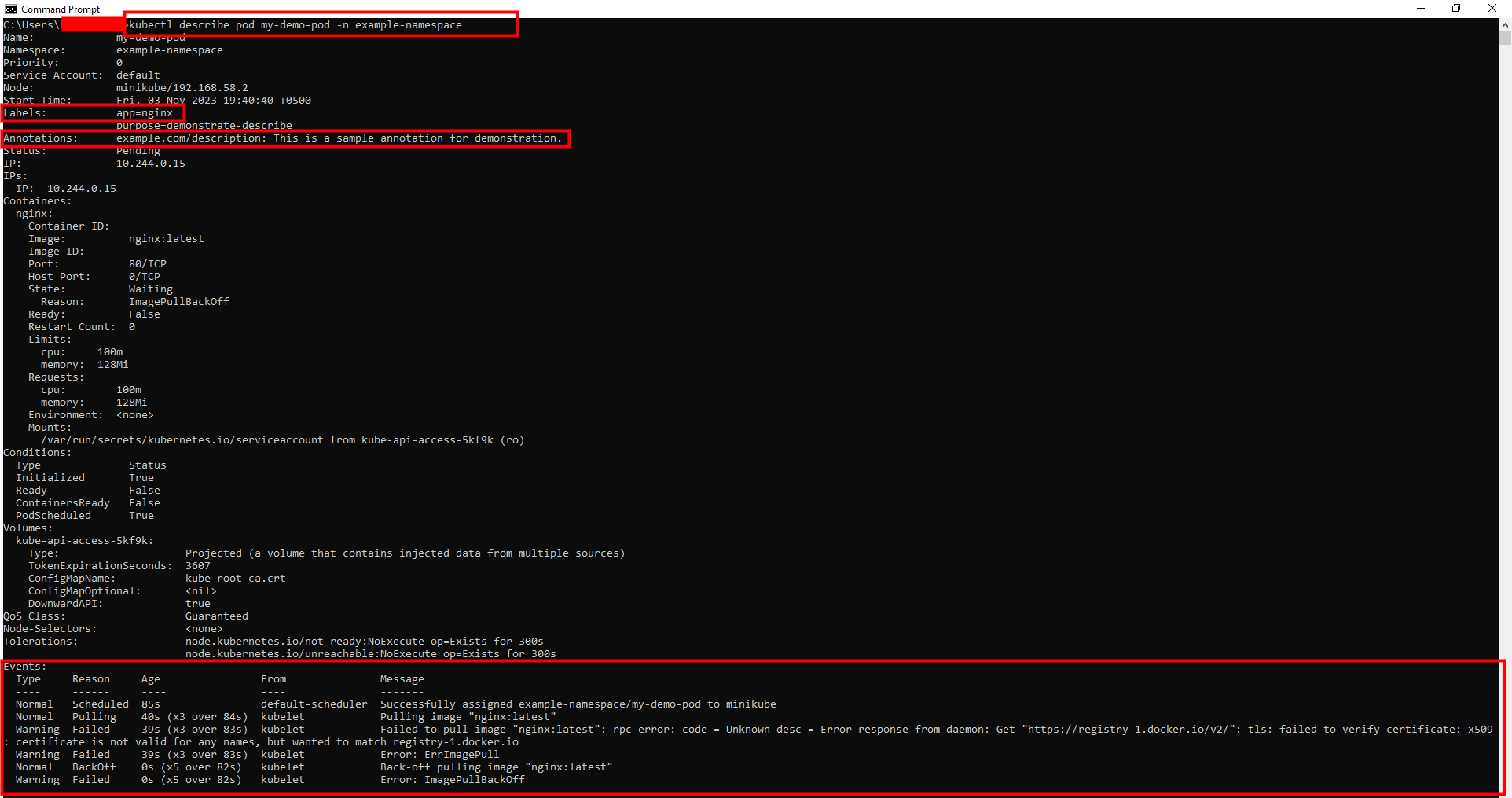
Cấu trúc output của describe pod:
- Name/Namespace/Labels/Annotations: Metadata cơ bản.
- Status: Phase (Pending/Running/Succeeded/Failed/Unknown), Conditions (Ready, Initialized, etc.), IP/Node.
- Containers/Init Containers: Image, State (Running/Waiting/Terminated), Ready, Restart Count, Probes.
- Volumes/Mounts: Chi tiết storage.
- Events: Last events liên quan đến Pod (rất hữu ích cho debug).
Use cases debug:
- Pod Pending: Check events cho FailedScheduling hoặc Insufficient resources.
- CrashLoopBackOff: Xem Restart Count cao, Last State Terminated với exit code/reason.
- Not Ready: Check Conditions False (e.g., ContainersReady False).
Syntax: kubectl describe pod [-n ].
Options:
--show-events=false: Ẩn events nếu không cần.- Output chỉ phần: Kết hợp với
| grep Eventsđể filter.
Dưới đây là ví dụ output kubectl describe pod minh họa các phần chi tiết như Status và Events.
kubectl exec Là Gì Và Cách Sử Dụng Để Debug
kubectl exec cho phép chạy lệnh bên trong container của Pod, tương tự SSH vào máy ảo. Đây là công cụ interactive để check files, processes, env vars, hoặc test network từ góc nhìn container.
Syntax: kubectl exec [-c ] [-n ] [-it] --.
Options:
-i: Interactive (stdin).-t: TTY (pseudo-terminal cho shell).-c: Chỉ định container (default đầu tiên).- Ví dụ shell:
kubectl exec -it my-pod -- /bin/sh(mở shell).
Use cases debug:
- Check files:
ls /app,cat /etc/config. - Processes:
ps aux,top. - Network:
curl localhost:80,ping google.com. - Env:
env | grep DB.
Lưu ý: Exec yêu cầu container running; nếu crash, dùng ephemeral debug container (nâng cao, không trong CKAD cơ bản).
Kết Hợp describe Và exec Với Các Công Cụ Khác Để Debug Toàn Diện
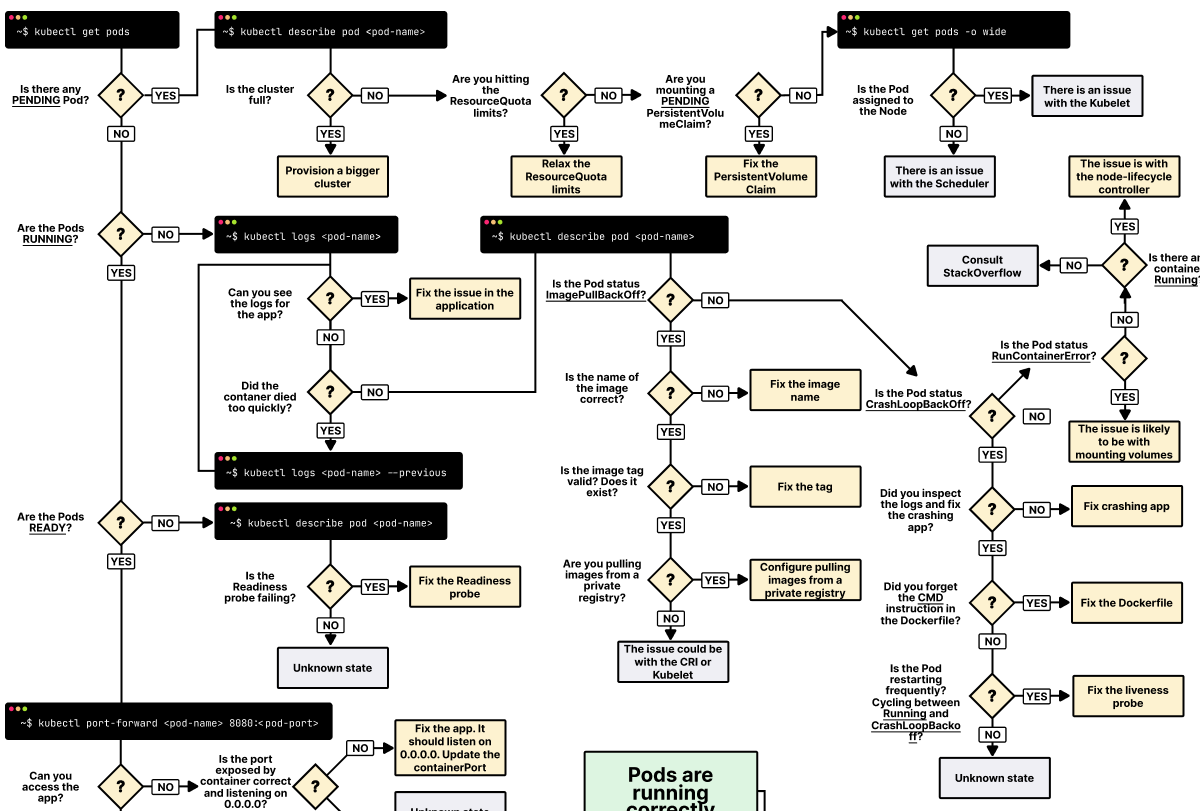
Debug hiệu quả thường kết hợp:
get pods: Xem overview status.describe pod: Xem details và events.logs: Xem output.exec: Interact nội bộ.
Ví dụ workflow debug Pod không Running:
kubectl get pods: Thấy Pending/CrashLoop.kubectl describe pod: Check events (e.g., ImagePull fail).- Nếu Running nhưng not Ready:
execcheck probes fail (e.g., curl health endpoint). - Nếu crash:
logs --previous+execcheck config files.
Bảng Cheat Sheet Lệnh Debug Với describe Và exec
| Lệnh | Mô tả | Ví dụ |
|---|---|---|
kubectl describe pod |
Chi tiết Pod, events | kubectl describe pod nginx-pod |
kubectl describe node |
Debug node issues | kubectl describe node minikube |
kubectl exec -- |
Chạy lệnh non-interactive | kubectl exec nginx-pod -- ls /app |
kubectl exec -it -- sh |
Mở shell interactive | kubectl exec -it nginx-pod -c nginx -- /bin/sh |
kubectl exec -c |
Chỉ định container | kubectl exec -c sidecar my-pod -- tail log |
kubectl describe pod \| grep Events |
Filter events | kubectl describe pod my-pod \| grep Events |
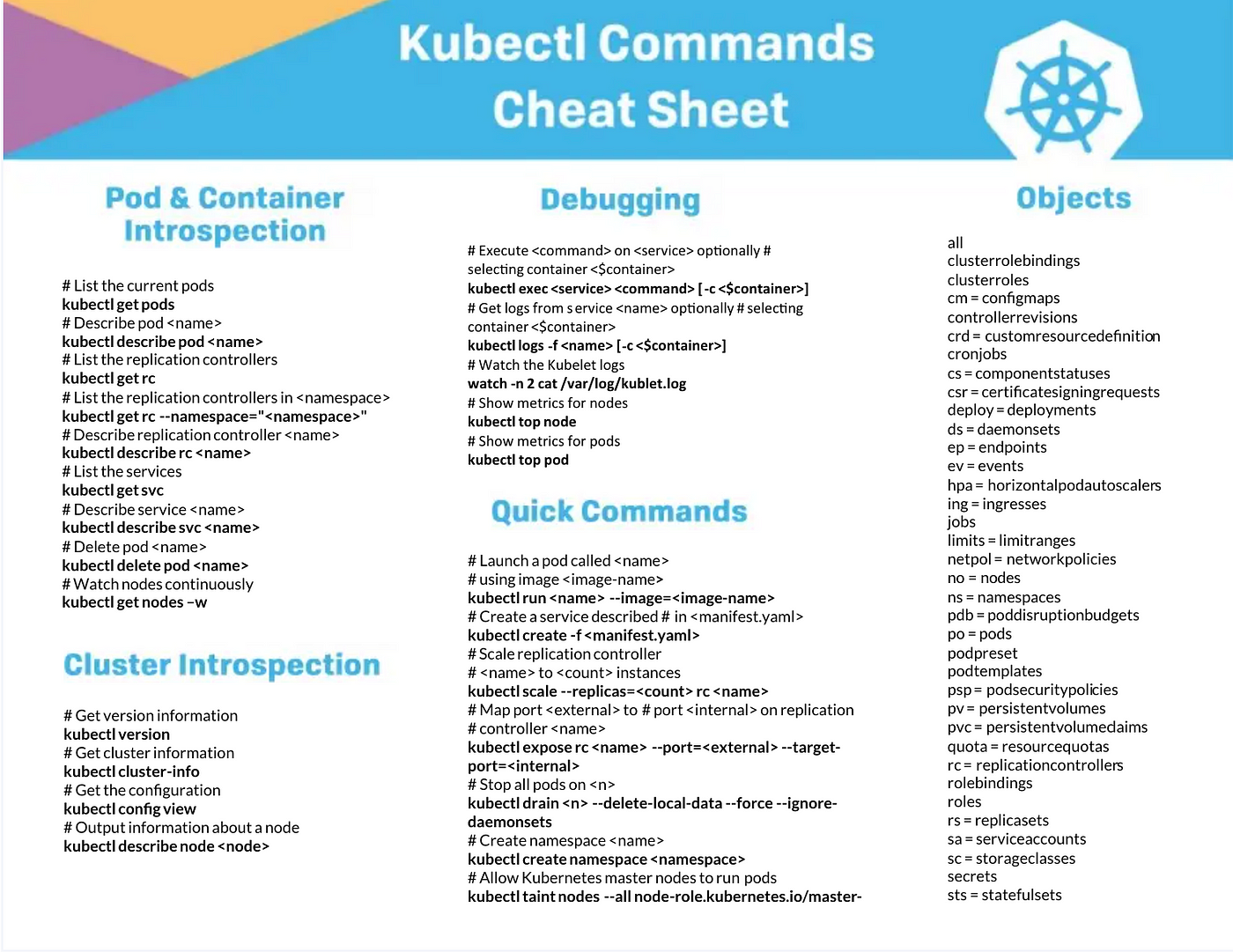
Dưới đây là cheat sheet debug Pod, tóm tắt commands cho observability.
Liên Hệ Với Chứng Chỉ CKAD
Domain Observability (10%) nhấn mạnh debug với describe/exec, chiếm phần lớn task. Các nhiệm vụ điển hình:
- Describe Pod để tìm lý do FailedMount hoặc OOMKilled.
- Exec vào container kiểm tra env vars hoặc files gây error.
- Kết hợp với logs debug multi-container Pod.
Mẹo thi:
- Describe luôn đầu tiên cho overview; exec cho deep dive.
- Thời gian: 4-6 phút/task, dùng autocomplete (kubectl d p).
- Nhớ -c cho multi-container, -it cho shell.
- Luyện trên Katacoda: Tạo Pod fail và debug.
- Kết hợp
get eventstừ Bài 10 cho full picture.
Thực Hành Thực Tế Trên Minikube
-
Tạo Pod healthy:
kubectl run debug-pod --image=nginx -
Describe Pod:
kubectl describe pod debug-pod # Xem status Running, events Pulled/Scheduled -
Exec vào Pod:
kubectl exec -it debug-pod -- /bin/bash # Bên trong: ls /usr/share/nginx/html, ps aux, env | grep PATH, exit -
Tạo Pod fail (ví dụ sai image):
kubectl run fail-pod --image=nonexistent:image kubectl describe pod fail-pod # Thấy events ImagePullBackOff -
Debug multi-container (từ Bài 8):
kubectl describe pod sidecar-pod # Xem containers status kubectl exec -it sidecar-pod -c app-container -- curl localhost:80 -
Cleanup:
kubectl delete pod debug-pod fail-pod.
Nếu exec fail (Pod not Running), check describe trước.
Kết Luận
Bài này mình đã hướng dẫn chi tiết debug Pod với kubectl describe và exec, từ lệnh cơ bản đến kết hợp debug. Bạn giờ có thể troubleshoot Pods hiệu quả, hoàn tất domain Observability cho CKAD. Tiếp theo, ở Bài 12: Tối Ưu Pod Với Resource Limits Và Requests, chúng ta sẽ bước vào domain Pod Design để học tối ưu hóa.