
My 3-Month Journey to Becoming a Kubestronaut

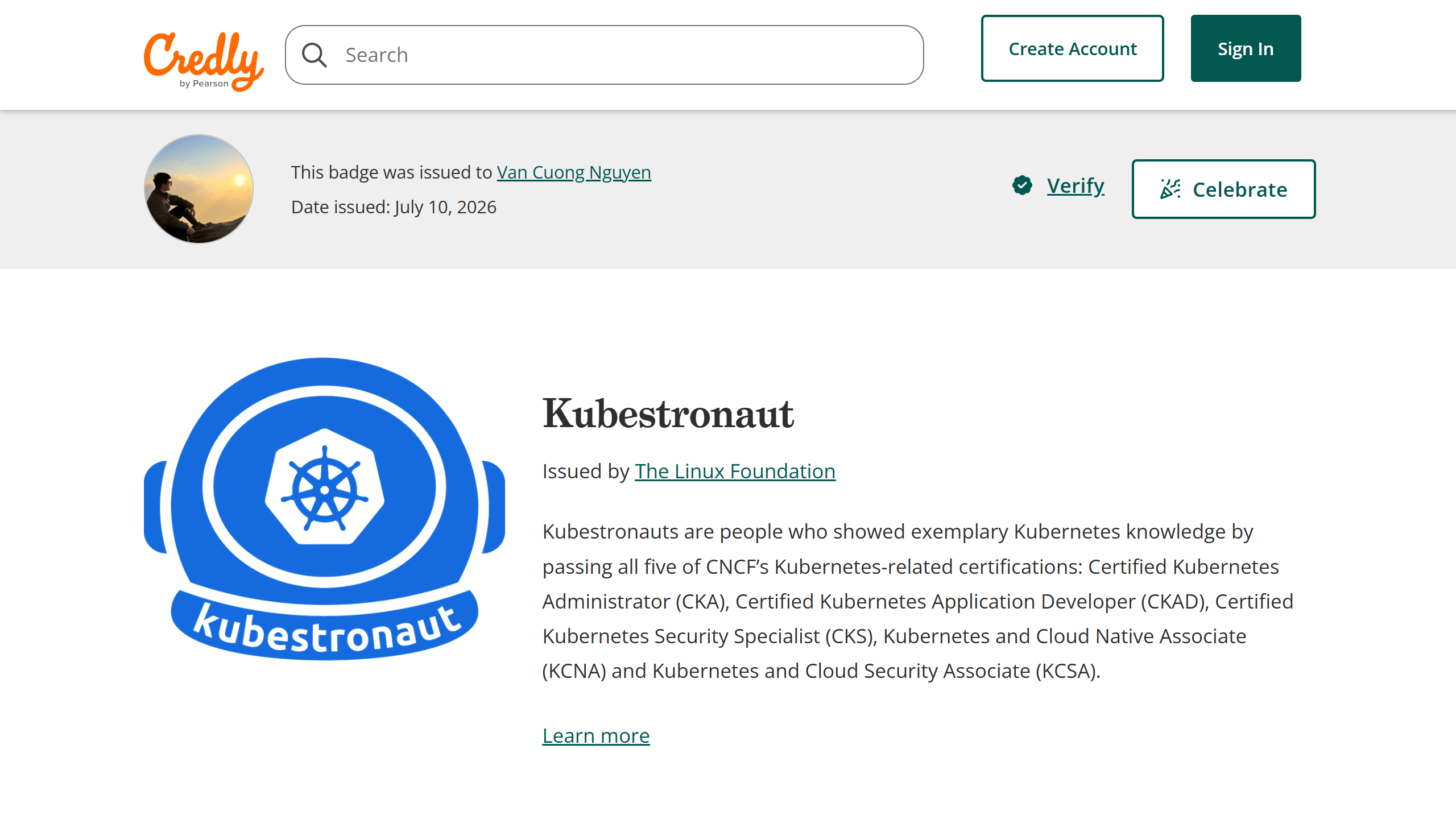
Table of Contents
Hi everyone. I’m Cường, and I recently completed five Kubernetes certifications: CKA, CKAD, CKS, KCNA, and KCSA, becoming a Kubestronaut. This article summarizes my experience preparing for these certifications. Hopefully, it can be useful and serve as another practical resource for those of you planning to take them.
My background is in AI/ML. Before starting this journey, I had no experience with Kubernetes, but I had a solid foundation in software, OS, Networking, System Design, and Cloud (AWS). That background helped me learn faster, and I think those who already have Kubernetes experience could move even faster.
I started on April 11, 2026, when I saw that DevOps VietNam had partnered with the Linux Foundation on the Đặc quyền kép: mã giảm giá và hoàn tiền program, which helped reduce the cost of studying for and taking these international certifications significantly. Cost had previously been quite a big barrier for many Vietnamese engineers. Since I had already been planning to learn Kubernetes, I decided to start right away.
I completed my final certification on July 1, spending a total of 142 hours, which I tracked, averaging around 1.75 to 2 hours per day. Because I studied continuously without long breaks, I was able to save quite a bit of time and effort. Below is the detailed breakdown of the time I spent preparing during this period:
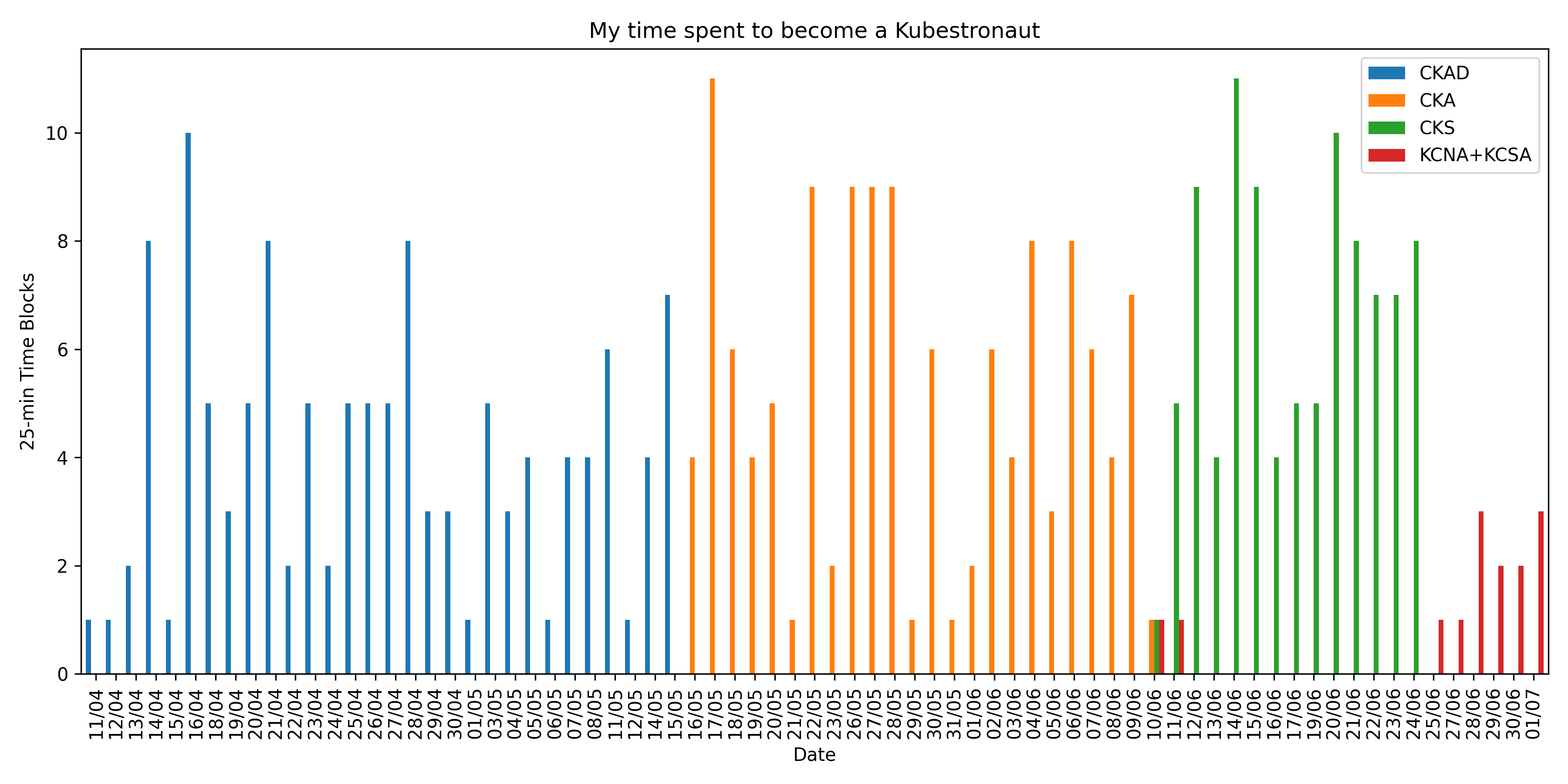
The only learning resources I used were KodeKloud courses. Below is the breakdown for each certification, in the order I took them: CKAD > CKA > CKS > KCNA/KCSA.
1. CKAD
1.1. Course
I took KodeKloud’s CKAD course. The lecture videos, and especially the hands-on labs, were very useful. If you have no prior Kubernetes experience, I recommend watching the videos first and then doing the labs. If you already have experience, you can jump straight into the labs and go back to the videos afterward if needed to reinforce your understanding.
Lightning Labs: There are 2 larger labs that require you to put together the components you have learned to build a small system. They are much longer than a single question in the real exam, but definitely worth doing.
1.2. Mock Exam
-
2 KodeKloud exams included in the course: very easy if you have already completed the Lightning Labs.
-
Killer.sh: 2 sessions are included when you register for the exam, although for CKAD both sessions use the same question set. They are longer and more difficult than the real exam, but they help you get familiar with the exam environment and scoring. I actually quite enjoyed working through Killer.sh, and some of the shell scripting techniques in the solutions were useful as well.
You can also check out: CKAD Mock Exam
1.3. Tips
In addition to Khánh Linh’s tips, I would add the following:
-
Choose your questions strategically. Start with topics you are comfortable with. At the beginning of every exam question, there is a link to the official K8s documentation with the topic name, for example Services, ConfigMaps, or Secrets. Glance at that line first to identify the topic. If it is familiar, read the question, and if you are confident you can solve it, start working on it. Otherwise, move on to another question. CKAD is easy enough that you can probably work through it sequentially, but I think this approach becomes more useful for CKA and CKS.
-
Since partial credit is awarded, try to complete as many tasks within each question as possible to maximize your score. Even difficult questions often contain some easier parts that you can still complete.
-
Imperative commands: memorize them so you can create resources quickly and save time.
-
I usually put
-nright afterkubectl, or the preconfiguredkalias, so I do not forget the namespace. This helps reduce errors caused by working in the wrong namespace. -
Remember the short names for resources so you can work faster:
deployfor deployment,svcfor service,cmfor configmap,safor serviceaccount,nsfor namespace, and so on. -
A few useful
vimoperations:dddeletes the current line in normal mode,d2ddeletes 2 lines,d3ddeletes 3 lines, and so on.d$deletes from the cursor to the end of the line.- You will sometimes need to copy the YAML for a
podfrom the official documentation into the podTemplate section of adeploymentYAML file. Here is how to adjust indentation for multiple lines at once: first pressESCto return to normal mode, move to the first line, then pressCtrl Vto enter visual block mode. Usejor the down arrow to select the lines you want to indent, then: Shift >to indent to the right.2 Shift >means indent twice,3 Shift >means three times, and so on.Shift <to indent to the left.2 Shift <means twice,3 Shift <means three times, and so on.
It took me around 5 weeks to complete CKAD: 4 weeks for the course and labs, then 1 week for mock exams and the real exam. After finishing the exam, I was quite confident that I had answered almost everything correctly, but I ended up scoring only 86%…
2. CKA
After finishing CKAD, I continued taking advantage of the DevOps VietNam x Linux Foundation MegaMay offer. I decided to buy the CKA + CKS bundle and started immediately.
2.1. Course
I took KodeKloud’s CKA course.
Around 60% of the content overlaps with CKAD. In addition, it covers:
- Troubleshooting:
kubelet,kube-apiserver,etcd,kube-controller-manager,kube-scheduler, or application issues such as ImagePullBackOff, CrashLoopBackOff, and so on. - Cluster Maintenance: upgrading with
kubeadm, backing up and restoringetcd, and so on. - TLS, Certificates, DNS
- DaemonSet, Static Pod, HorizontalPodAutoscaler
- Gateway API
- Helm and Kustomize
You should spend some time setting up a small cluster yourself with kubeadm. I used Multipass to create Ubuntu VMs on my Mac and tried both a manual setup, where I created TLS certificates myself, manually copied them to each VM, configured networking and DNS, and so on, as well as using kubeadm.
2.2. Mock Exam
-
KodeKloud: 3 exams. The difficulty is about the same as the real exam.
-
Killer.sh: 2 sessions with different question sets. The questions are longer and harder than the real exam.
You can also check out: CKA Mock Exam
2.3. Tips
In addition to Phi Hùng’s tips, I would add the following:
-
During the exam, you should use 2 terminals. Some questions require you to edit a manifest file while also checking the cluster’s current configuration at the same time. For example, NetworkPolicy questions often require matching the correct pod labels, and you probably do not want to keep exiting
vim, copying something, and openingvimagain just to paste it. -
Choose the question order strategically. Start with topics you are familiar with. At the beginning of every exam question, there is a link to the official K8s documentation with the corresponding topic name, for example Services, ConfigMaps, or Secrets. Glance at that line first to identify the topic. If it is familiar, read the question, and if you are confident you can solve it quickly, start working on it. Otherwise, move on to another question first. Personally, I leave every troubleshooting question until THE END because it is difficult to know how long one will take just by reading the question. The exam basically tells you there is a problem with
kubelet,kube-apiserver, oretcdand asks you to fix it. -
Back up static pod YAML files before editing them: This applies to questions involving
kube-apiserver,kube-controller-manager,kube-scheduler, andetcd. If you completely mess up a manifest file, you can restore it to its original state from the backup and try again. I learned this one the hard way. I failed akube-apiservertroubleshooting question because I did not create a backup. After making a change, saving it, and seeing that the container still would not run, I wanted to restore the original state and start over, but I could not.
cp /etc/kubernetes/manifests/kube-apiserver.yaml kube-apiserver.yamlAnd if you need to reset it, overwrite the original:
cp kube-apiserver.yaml /etc/kubernetes/manifests/kube-apiserver.yaml- Practice Helm, and Kustomize to a reasonable extent. Helm is more likely to appear. Kustomize usually requires more YAML editing for patches, overlays, and so on, which takes more time, so I think it is less likely to be tested heavily. I did not prepare enough for Helm and ended up failing 1 question.
It took me almost 4 weeks in total to complete CKA: 2 weeks for the course and labs, 1 week building and experimenting with my own cluster, and 1 week for mock exams and the real exam.
I performed worse than I did on CKAD and left 3 out of 15 questions incomplete: the troubleshooting question and the Helm question mentioned above, plus another one about Pod Topology Spread Constraint.
I passed with 72%.
3. CKS
CKS focuses on Kubernetes security and requires you to have CKA before taking the exam. The content includes:
-
Cluster Security:
kube-benchto identify security issues based on CIS benchmarks and apply remediation.- Certificates, Mutual TLS, Kubeconfig, RBAC, Service Account. Similar to CKA.
- Network Policy: both native K8s policies and Cilium policies.
- Kubelet Security: anonymous authentication, read-only port
-
System Security:
- Host security: users, groups, permissions, SSH
- Network firewall:
ufw
-
Pod Security:
- Pod Security Standard and Pod Security Admission
- Admission Controller
- Open Policy Agent (OPA) and Gatekeeper
- Pod-to-pod encryption with Istio
PeerAuthentication
-
Container Security:
- Security Context:
readOnlyRootFilesystem,runAsNonRoot,runAsUser,runAsGroup,allowPrivilegeEscalation. - Seccomp, AppArmor to restrict system calls.
- Custom container runtime: gVisor, Kata Container.
- Security Context:
-
Code Security:
- Static analysis: you may be required to manually inspect source code for issues such as exposed credentials, or use tools such as
kube-linter - Generate SBOMs using
bom,syft, ortrivy - Scan Docker images for vulnerabilities using
trivy - Scan K8s YAML files for vulnerabilities using
kubesec
- Static analysis: you may be required to manually inspect source code for issues such as exposed credentials, or use tools such as
-
Monitoring, Logging, Runtime Security:
- Audit log: configure audit logging for the cluster through
kube-apiserver. - Threat Detection: write Falco rules with custom output, or
grepFalco logs to identify pods/deployments with security issues and fix them.
- Audit log: configure audit logging for the cluster through
3.1. Course
I took KodeKloud’s CKS course using the Standard plan. At USD 29 per month, there was already a lot to learn from. I set a goal to finish everything within 1 month to save money, which turned out to be pretty good motivation.
I tried changing my study approach for CKS by jumping straight into the labs without watching the videos first. While working through each lab, I researched the necessary concepts, commands, and configuration myself. After completing the lab, I watched the video if I still had questions, and also to get a clearer picture of the overall topic.
I think this approach saves time if your foundation is already solid, because the topics covered in the CKS exam are not particularly difficult individually.
3.2. Mock Exam
As usual, I only used 2 sources:
-
KodeKloud: 3 mock exams included in the course. Some questions overlap, around 30 to 50%. I think the team intentionally designed them that way because those topics appear fairly often in the real exam. Repeat them until you can score 90%.
One thing to keep in mind is that KodeKloud does not award partial credit the way the real exam does. You need to complete EVERY part of a question correctly to receive the points. If any part is wrong, you get 0 for that question. So the score here does not perfectly reflect the real exam. I think if you can score above 75%, you are ready for the actual exam.
-
Killer.sh: 2 sessions with different question sets, both longer and harder than the real exam. I only scored 60% and 52% on these 2 sessions, but I still quite enjoyed working through them and learned a lot of useful techniques and ways of thinking from reading the solutions.
It took me 2 weeks to complete CKS immediately after finishing CKA: 1 week for the course, and 1 week for mock exams and the real exam.
I passed with 82%, which was lower than I expected. I felt like I had done quite well and thought I had only missed around 1 question.
You can also check out:
3.3. Tips
In addition to the CKA tips such as using 2 terminals, choosing questions strategically, backing up static pod YAML files, and so on, I would add the following for CKS:
-
For Pod Security Admission, the easier questions may simply ask you to add a label to the namespace using
pod-security.kubernetes.io/:.The harder type asks you to figure out why a pod cannot be created or run because it violates a policy, then fix it.
You can use
kubectl get deploy/pod -o yamland look at.status.conditions[].message. The answer is usually right there and very clear.I encountered a question like this in the real exam, and at first I was a little confused because I did not know where to look for the error.
kubectl describedid not show the relevant event.
For example, kubectl describe deploy will show:
Events:
    Type    Reason             Age   From                   Message
    ----    ------             ----  ----                   -------
    Normal  ScalingReplicaSet  30s   deployment-controller  Scaled up replica set test-6bc97d7d78 from 0 to 1
There is nothing useful here.
But kubectl get deploy -o yaml gives you the cause very clearly:
status:
    conditions:
    - lastTransitionTime: "2026-06-26T17:28:17Z"
        lastUpdateTime: "2026-06-26T17:28:17Z"
        message: Created new replica set "test-6bc97d7d78"
        reason: NewReplicaSetCreated
        status: "True"
        type: Progressing
    - lastTransitionTime: "2026-06-26T17:28:17Z"
        lastUpdateTime: "2026-06-26T17:28:17Z"
        message: Deployment does not have minimum availability.
        reason: MinimumReplicasUnavailable
        status: "False"
        type: Available
    - lastTransitionTime: "2026-06-26T17:28:17Z"
        lastUpdateTime: "2026-06-26T17:28:17Z"
        message: 'pods "test-6bc97d7d78-s89x2" is forbidden: violates PodSecurity "restricted:latest": allowPrivilegeEscalation != false (container "nginx" must set securityContext.allowPrivilegeEscalation=false), unrestricted capabilities  (container "nginx" must set securityContext.capabilities.drop=["ALL"]), runAsNonRoot != true (pod or container "nginx" must set securityContext.runAsNonRoot=true), runAsUser=0 (container "nginx" must not set runAsUser=0), seccompProfile (pod or container "nginx" must set securityContext.seccompProfile.type to "RuntimeDefault" or "Localhost")'
        reason: FailedCreate
        status: "True"
        type: ReplicaFailure
    observedGeneration: 1
    terminatingReplicas: 0
    unavailableReplicas: 1
From here, just follow the instructions in the message field and fix the configuration accordingly.
-
There are two common question types that require editing the
kube-apiservermanifest file: enabling audit logs and enabling an admission controller. For both types, do not forget to mount the correct file or directory for the audit configuration or admission policy. -
For Falco questions, be prepared to write at least a custom output, and possibly even a rule. You will have access to the Falco documentation during the exam, but you should familiarize yourself with it beforehand so you can find things quickly.
The page I found most useful is “Supported Fields for Conditions and Outputs,” which lists all available field names for output and conditions.
Remember how to navigate there during the exam:
Falco docs > Reference > Rules > Supported Fields for Conditions and Outputs.
-
Similarly, for Cilium NetworkPolicy questions, a useful page is Overview of Network Policy. Click the Layer3/4 link to find sample manifests depending on what the question asks for.
4. KCNA & KCSA
These are two theory based certifications covering Kubernetes and its ecosystem.
The exams are multiple choice. Both the questions and answers are short and straightforward, without trying to trick you.
To be honest, I do not think these two certifications provide as much value as CKA, CKAD, or CKS because they are purely theoretical and also quite expensive. I would only recommend taking them if you want to earn the Kubestronaut title 😀
After reading Vũ Công Thạo’s experience, I did not underestimate KCSA either.
My 1 month KodeKloud subscription was still active after finishing CKS, so I immediately moved on to the KCNA and KCSA courses and did the mock exams the day before the real exams.
They were quite useful because many of the questions also appeared in the actual exams.
5. Cost
The total cost of my KodeKloud and Udemy courses was around USD 70. For Udemy, try to find discount codes to save some money.
Exam costs: The total cost of buying all the certifications individually would have been USD 1,835, which is definitely not a small amount.
Thanks to DevOps VietNam’s dual benefit program, I was able to reduce the cost as follows:
- CKAD: 40% discount + 15% cashback, bringing the final cost down to around USD 227. I have already received the cashback.
- CKA + CKS bundle: 60% discount + 10% cashback, bringing the total down to around USD 355. I have already received the cashback.
- KCNA + KCSA bundle: 50% discount + 10% cashback, bringing the total down to around USD 203.
If you have already registered for the DevOps VietNam dual benefit program, make sure to read the instructions carefully so you understand the process correctly.
In total, the exam cost came down to just USD 785, around 67% less than buying the certifications individually!
A big thank you to DevOps VietNam for making these offers available and helping ensure that cost is no longer such a major barrier for Vietnamese engineers.
6. Conclusion
That is my summary of the experience of earning the Kubestronaut title. Hopefully, it will be useful for those of you planning to take these certifications.
Good luck!
One more thing: I also shared an English version of this article in this GitHub repository. If you have any questions, you can leave a comment below or create an Issue in the repo.
I am also the author of the AWS Cơ Bản (awscoban.com) blog, where I spent 6 months systematically organizing the core AWS knowledge around VPC, IAM, EC2, S3, RDS, Lambda, and more, covering around 90 to 95% of the key topics in the SAA-C03 exam.
Even though asking AI questions is extremely common now, having topics connected together in a coherent structure makes it easier to understand how they relate, remember them, and see the bigger picture. That is why I built the blog.
AWS knowledge such as VPC Networking, IAM Policy, Security Group, KMS, and so on also helped me quickly understand networking and security concepts when learning Kubernetes.